Networking Basics for Lighting Professionals

November 14, 2018
As lighting becomes more connected, facility managers, agents, architects and designers need to learn networking basics and terminology. While designing and installing a network sounds daunting, it is easier once you understand the basics. In this post, we talk about networking basics for smart lighting.
Types of networks
Networks connect computing resources that are local, geographically distributed, or in the cloud. Some organizations such as universities, government agencies and multi-national corporations have combinations of these networks to facilitate communication between employees, vendors and partners, and the community. Here are four types of networks.
- LAN — a local area network (LAN) is a computer network that interconnects computers and peripherals, such as printers, within a building or department.
- WLAN — A wireless local area network (WLAN) is a computer network that interconnects devices without wires. A popular WLAN standard is the Wi-Fi which has different types (a/b/g/n/ac/ax) depending on the version of the standard adopted by the device.
- WAN — a wide area network (WAN) is a geographically distributed public or private network that interconnects multiple LANs. The Internet is an example of a worldwide public WAN.
- Hybrid network — when an organization has a combination of private LAN/WAN networks and cloud computing, it is often described as a hybrid networking environment.
Network topologies
A network topology defines the interconnection of nodes on a network from a communications perspective and what path(s) data signals use to communicate from one device on the network to the next. In a given space, the network topology may be different than the physical location of nodes in a building or on a blueprint. Rather, it defines the hierarchy between the nodes from a communications perspective.
There are several topologies to consider. Each has its advantages and disadvantages, usually related to cost and complexity to implement, points of failure, geographical range that data can traverse, and effectiveness in moving data.
Different network topologies can affect not only data throughput and security, but also the reliability of the network over time. Some network topologies such as a line configuration can fail more easily because any node is a single point of failure for the entire network. More complex topologies such as mesh or “fully connected” are more challenging to implement but build in redundancy for improved reliability. There can also be hybrid types of network topologies and multiple topologies can be interconnected through different types of network devices.
Network components
Common network components include the following:
- switches* — switch connects devices such as computers and printers together on a computer network to receive, process, and forward the data to intended destinations. Switches can be used to connect luminaires within a building to a LAN and are used to share the same network services and configurations among nodes belonging to the same LAN.
- routers —hen a device wants to communicate with another device not on the same LAN, the message is passed to a router. A router is a network device that forwards data packets between different networks.
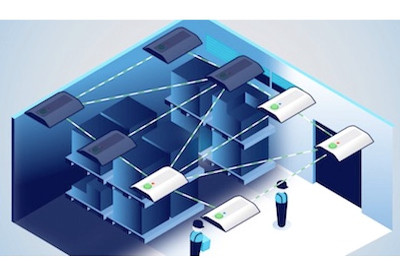
- access points — an access point (AP) is a device used to provide connectivity among wireless devices to a wireless network and/or between wireless devices and a wired network. It is used to extend the coverage of a network over an area where wireless communicating devices are located.
- devices — the Internet of Things (IoT) is the broad definition of a connected network of devices other than computers and smartphones. It includes everyday items (e.g., lighting fixtures, refrigerators and kitchen appliances, TVs and entertainment devices), and almost every smart device has some information that can be shared to a network.
*Network components (such as switches) are essentially functionalities and can be implemented as a software on network nodes and do not always require a separate hardware device.
Network communications protocols
The information exchanged between devices through a network or other media is governed by rules and conventions set up in communication protocol specifications. Communication protocols are formal descriptions of digital message formats and rules. They describe the syntax, semantics, and synchronization of analog and digital communications. Some of the transmission properties defined by protocols can include packet size, transmission speed, flow control, error recovery methods, and address formatting. Network protocols also define rules of how network devices access and share the network resources.
Communications protocols are required to exchange messages in or between computing systems. In fact, computer networks cannot exist without them. Just as you can’t call another phone without using its exact telephone number, computers can’t exchange information without formatting the data in a way the receiving computer can recognize and process, so the data is routed to the right location. For digital communications to be successful, both the sender and the recipient need to speak the same “language”. Protocols, which may be implemented by hardware, software, or a combination of both, help make this possible.
The most popular protocol is TCP/IP, the Transmission Control Protocol/Internet Protocol. TCP/IP is an open standards protocol, actually a suite of communication protocols, used to interconnect network devices on the internet or on a private network. It specifies how data is split into packets, addressed, transmitted, routed and received at the destination.
There are a number of wireless protocols that are used to connect wireless devices to a network. The use cases for wireless are so varied that no one protocol provides an optimal solution. Some protocols are optimized to conserve battery on mobile devices, while others offer higher speeds or more reliable and longer-distance connections.
This article was first published online: info.osram.us/blog/networking-basics-for-lighting-professionals.
Photo source: Gerd Altmann on Pixabay.